
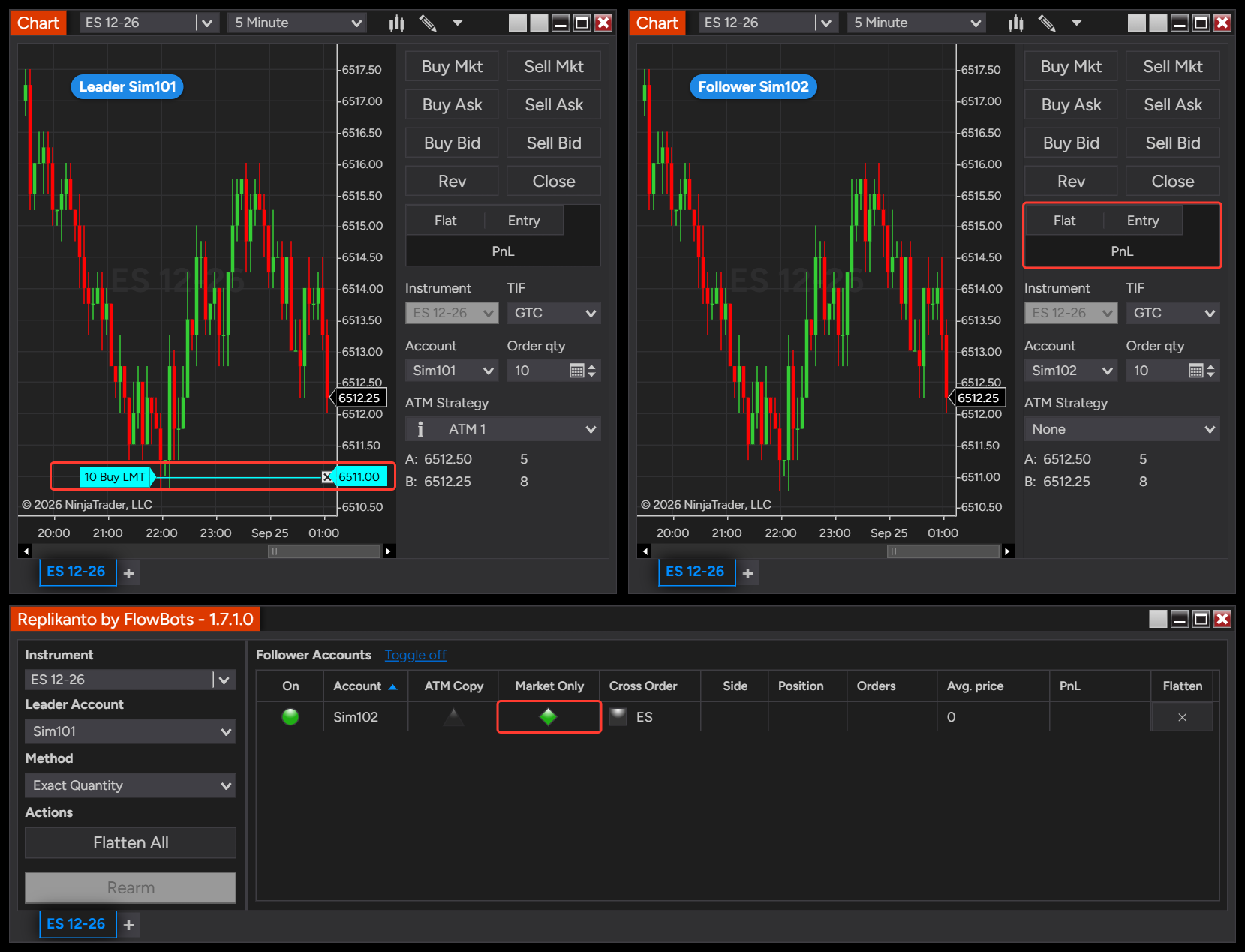
Market Only copies only what actually fills on the leader: each leader execution is sent to the follower as a market order. The leader’s working orders, such as limit entries, stops and targets, are not placed on the follower, so the follower tracks the leader’s position fill by fill with far fewer orders to manage.
- Executions only: the follower copies the leader’s fills, including partial fills, as market orders sized by your copy method.
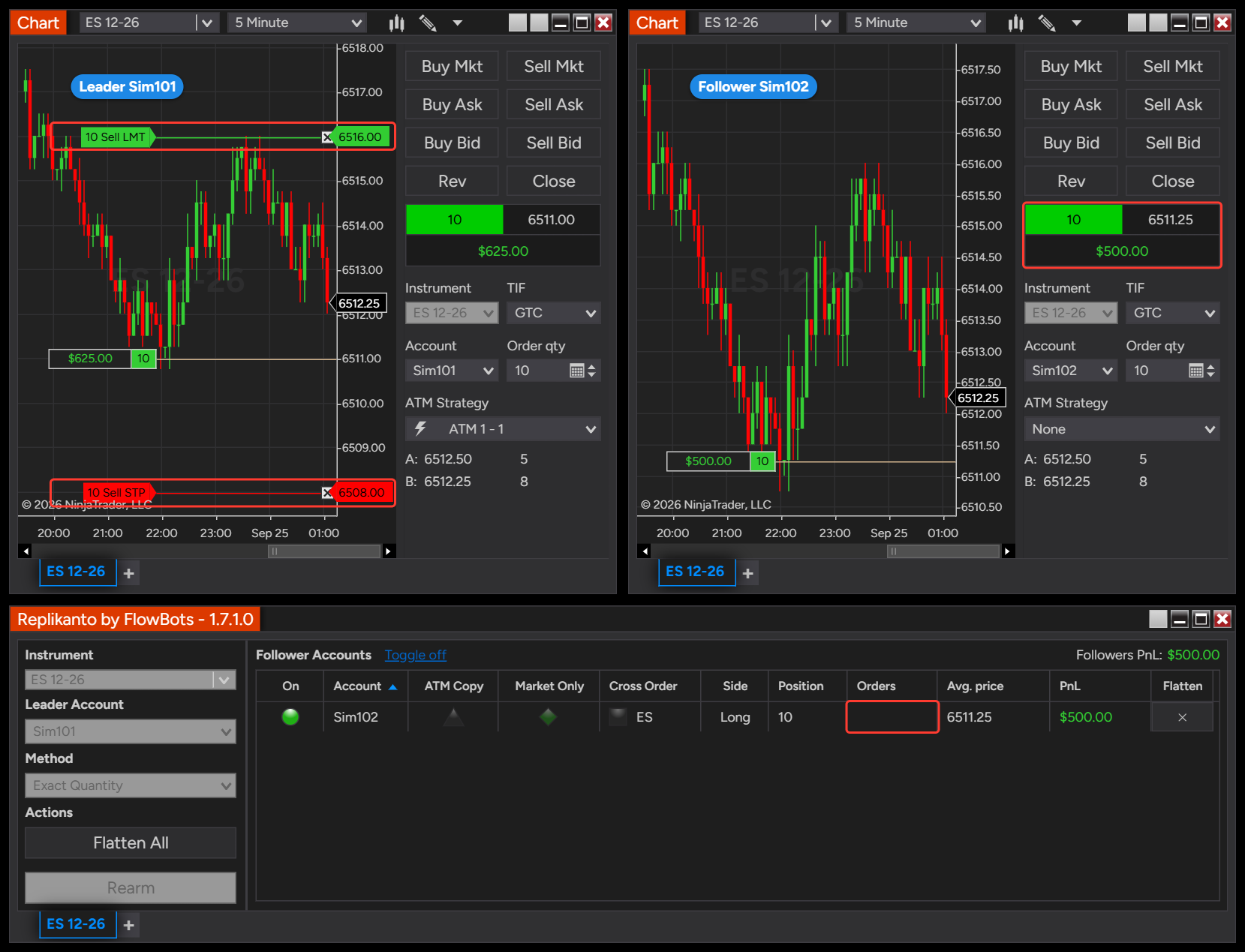
- No working orders on the follower: limit and stop orders that have not filled on the leader, including its stop loss and profit target, are not copied.
- Leftover fractions carry over: quantities round down to whole contracts or shares, and the leftover fraction is added to later fills.
- Local and remote followers: it works for followers on the same computer and on other computers, over your local network or the internet.
- Per follower: turn it on only for the followers you choose, one by one or for a whole group. It cannot be combined with ATM Copy on the same follower.
How it works
Entries
A market entry on the leader is copied as soon as it fills. A limit or stop entry on the leader is not copied while it is working: the follower waits, and enters with a market order only when the leader’s order fills. If the leader’s order fills in parts, the follower receives one market order for each part, sized by your copy method.
Exits
The leader’s stop loss and profit target are not copied, so the follower has no exit orders at the broker. When one of the leader’s exits fills, that execution is sent to the follower as a market order in the exit direction, sized by your copy method. When you close the leader’s position with NinjaTrader’s Close button, the Market Only follower’s position on that instrument is flattened, whatever its size. Only Market Only followers that are On or Out of sync are flattened this way: a follower that is Off or Disarmed is left as it is.
Quantities
Each market order is sized with the tab’s copy method, such as Exact Quantity, Ratio or Pre Allocation. With Exact Quantity the follower receives the same quantity as each leader fill. With the other methods, quantities are rounded down to whole contracts or shares and the leftover fraction carries over to the next fill. For example, with Ratio 0.5 and a 2-contract leader entry that fills in two parts of 1, the first fill gives 0.5 and nothing is sent; the second adds another 0.5 and the follower receives 1 contract. With Pre Allocation, each leader order is copied with the follower’s pre-allocated quantity, spread over that order’s fills.
When to use it
- You care more about the follower holding the same position as the leader than about matching the leader’s average price.
- You copy an automated strategy that works many limit or stop orders, and you want the followers to follow its position rather than every order it places.
- Your followers are Tradovate accounts and you run into Tradovate’s API rate limit and frozen orders. Copying only executions sends fewer orders and no order changes to the follower’s broker.
The trade-off is price. Every follower order is a market order, so it can fill at a different price than the leader’s limit or stop, for better or worse. The follower’s average price and PnL can end up further from the leader’s than with regular copying.
How to set it up
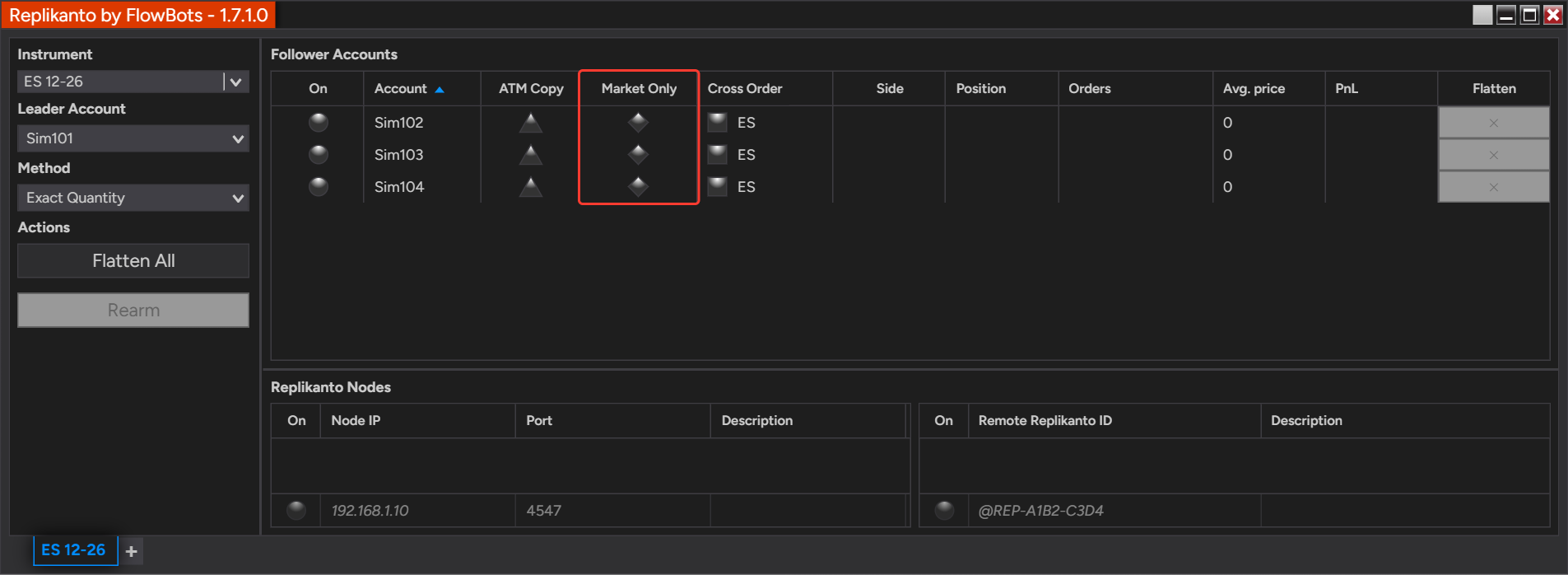
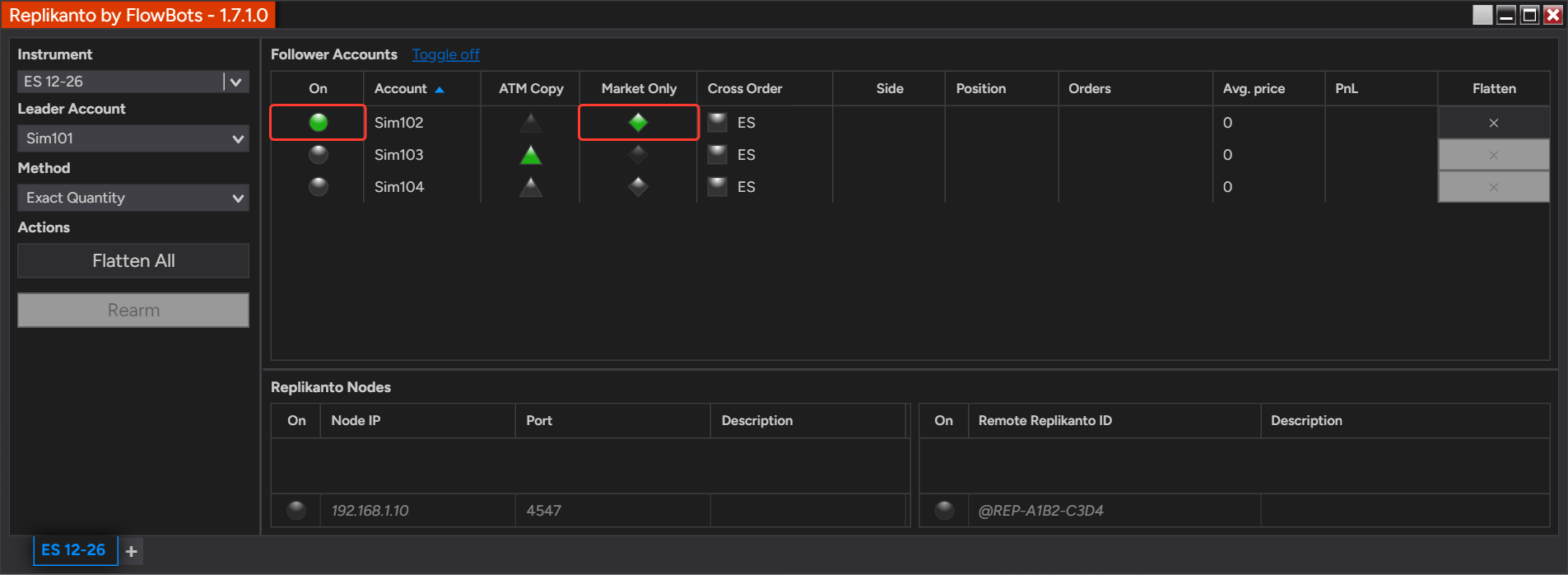
- In the Follower Accounts grid, find the Market Only column, which shows a diamond for each follower.
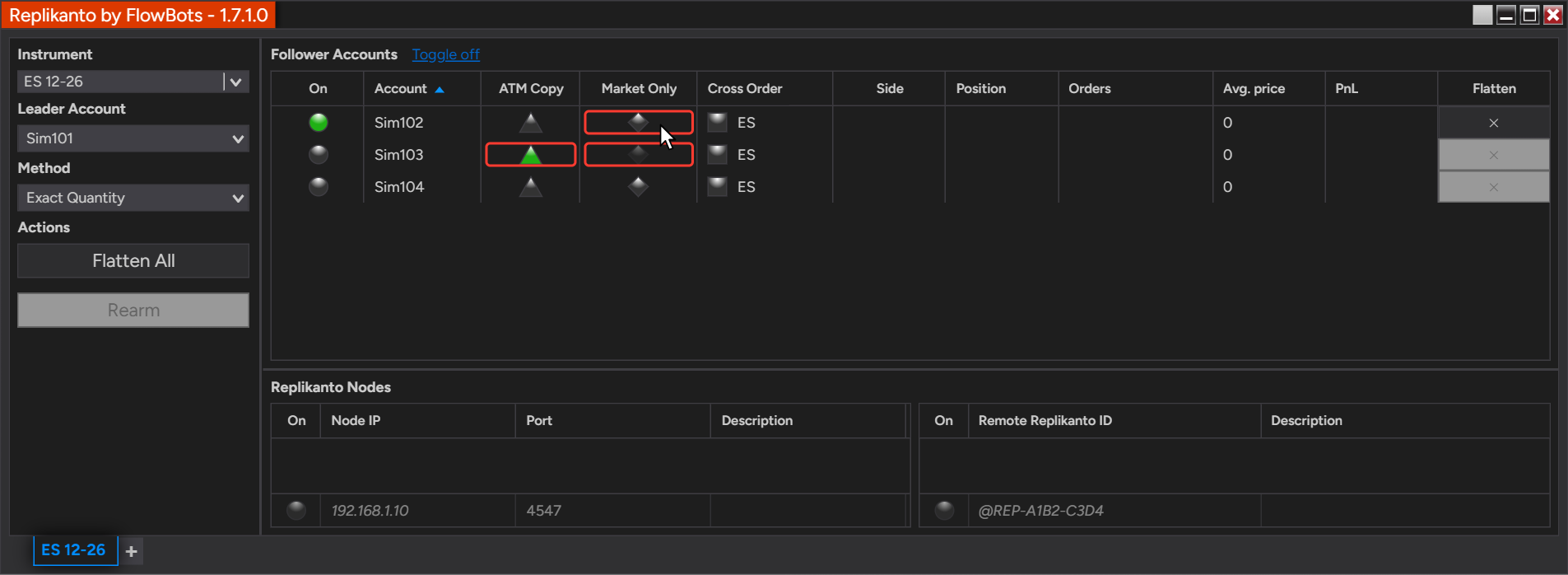
- Click the diamond of each follower that should copy only executions. Green means on, grey means off.
- If a diamond is dimmed and its tooltip says Market Only is unavailable, ATM Copy is on for that follower: click its triangle in the ATM Copy column to turn it off first. A dimmed diamond can also mean the follower is in a trade and its settings are locked.
- Make sure the follower itself is on in the On column.
- For followers on another computer, turn on Market Only in the Replikanto tab on that computer (Network Node Mode (Local Network) or Remote Node Mode (Internet)). The setting belongs to the follower, wherever the leader is.
- Consider turning on Follower Guard, for example Flatten the follower if it becomes out of sync, and test on Sim accounts first.
Turn it on for a whole group
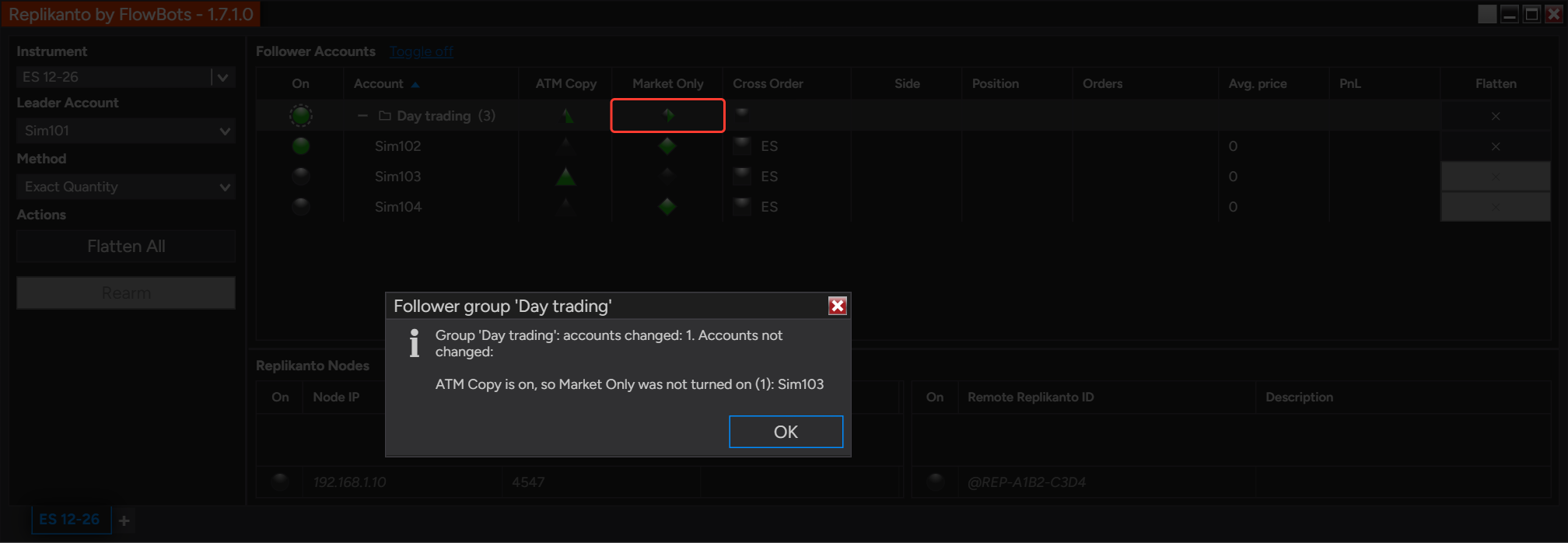
If your followers are listed in follower groups, the Market Only cell of a group header turns Market Only on for every account of the group, or off when it is on for all of them. It skips the accounts that are in a trade while Lock follower settings while in a trade is on (the default), and it does not turn Market Only on for an account that has ATM Copy on. Replikanto lists the accounts it skipped in a message. Grouping is off by default: the list stays flat until you turn on Group followers by connection or create a custom group.
Good to know
- A Market Only follower has no stop loss or profit target at its broker. If the connection to the leader is lost, the follower’s position stays open without a stop, so watch it closely and consider Follower Guard.
- Moving or cancelling the leader’s stop or target changes nothing on a Market Only follower: only fills are copied.
- Flatten All also closes Market Only followers, including one that Follower Guard has disarmed.
- The Flatten button of a follower group header also closes the group’s Market Only followers, on the leader’s instrument. It asks first.
- Market Only and ATM Copy cannot be combined on the same follower. Turn one off before turning the other on.
- With Lock follower settings while in a trade on (the default), you cannot change a follower’s Market Only while it holds a position or a working order.
- Market Only works with Cross Order: the market order goes to the follower’s Cross Order instrument.
- With a small ratio, a small fill can round down to zero and wait for the next fill before anything is sent.
- With Pre Allocation, each leader order is copied with the pre-allocated quantity. If the leader exits in several orders, such as two profit targets, each one sends the full pre-allocated quantity and can take the follower past flat into an opposite position: with Market Only and Pre Allocation, exit with one order, or use Ratio.
- The follower’s broker can still reject a market order, for example for margin or position limits.
- You remain responsible for making sure your use of Replikanto complies with each broker’s, platform’s and prop firm’s applicable rules and account agreements.
Related
- ATM Copy: run your ATM strategy on your followers
- Follower Guard: protect your followers when something goes wrong
- Follower groups: organize and act on many accounts
- Frozen orders and the Tradovate API rate limit
- How slippage is handled in Replikanto
- Follower Guard overview
- Why follower settings are locked during a trade
- Apply a setting to a whole follower group at once
Questions? Browse the Replikanto Knowledge Center or contact us. New to Replikanto? Try it free for 7 days.