Description
Trade one chart. Your follower accounts follow, sized your way.
Replikanto is a trade copier add-on for NinjaTrader 8, built for traders with several funded or evaluation accounts, family or client accounts, or more than one computer. You trade one account, the leader, and Replikanto places the matching orders on your follower accounts: entries, exits, stop and target moves, cancellations and OCO brackets. It works with the accounts you already have in NinjaTrader 8: Rithmic (including prop-firm accounts that connect through Rithmic), Tradovate, Interactive Brokers, the other brokers NinjaTrader connects to, as well as Sim and Playback accounts.
- Copy the way you already trade: Chart Trader, SuperDOM, ATM strategies, NinjaScript strategies, ScalperTicket, and orders sent from the Tradovate web and mobile apps or TradingView when the leader is a Tradovate account. Market, Limit, Stop Market, Stop Limit and MIT orders are supported. Learn more about automated strategies and TradingView.
- Size every follower your way: seven copy methods, a ratio or fixed quantity per follower, and Cross Order to copy between contract sizes such as ES and MES.
- Stay protected: Follower Guard can flatten and disarm a follower that falls out of sync or has an order rejected by its broker, and e-mail you. Flatten All closes the leader and its followers in one click, and on Rithmic accounts Replikanto checks the real position with the broker before it acts.
How it works
Open a Replikanto tab, choose the leader account and the instrument, switch on the follower accounts and choose how each one is sized. Each tab copies one leader account on one instrument; open more tabs or windows for other accounts and instruments.
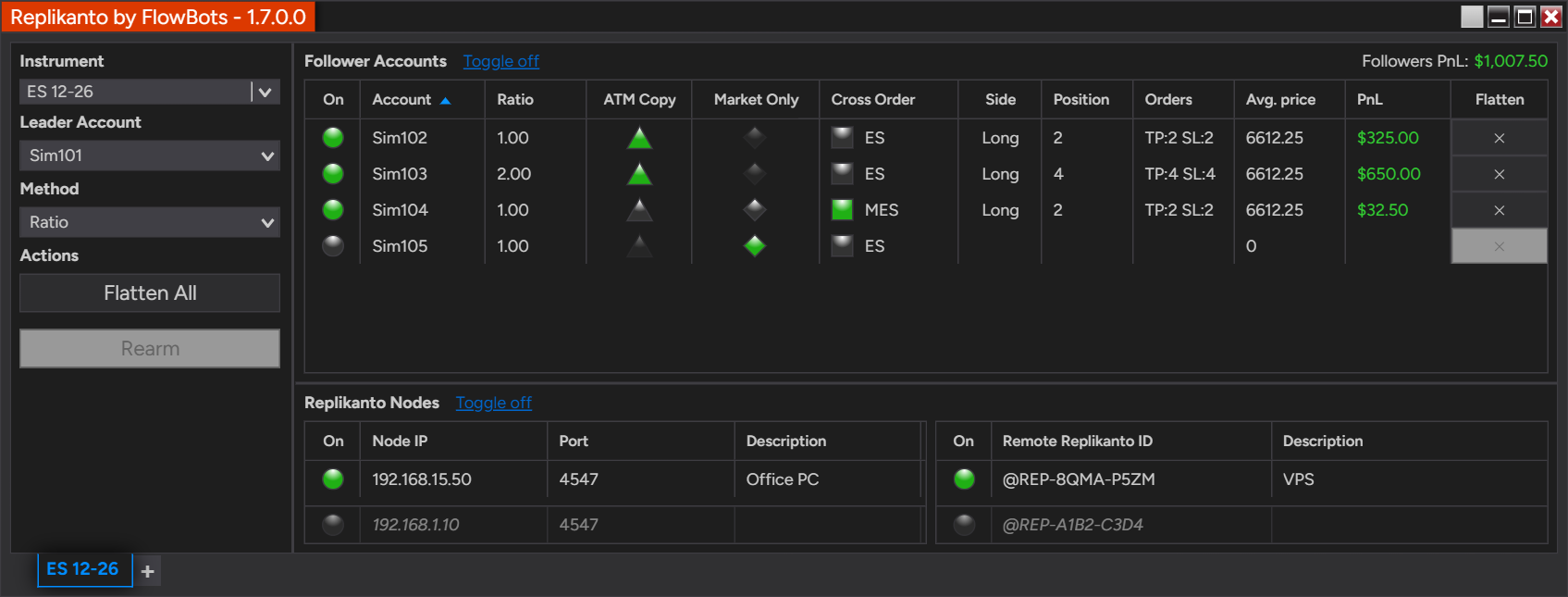
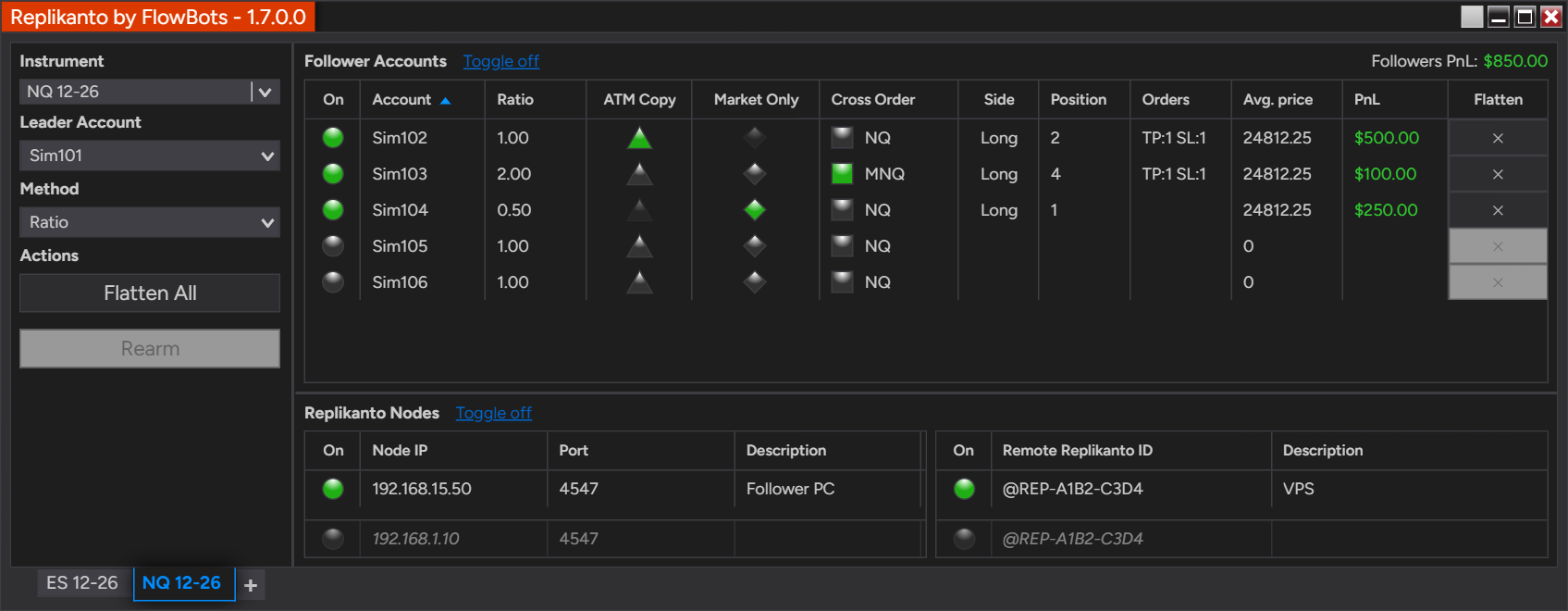
One Replikanto tab: the leader Sim101 trades ES, and each follower copies it its own way. Sim102 and Sim103 run ATM Copy with ratios 1 and 2, Sim104 receives MES through Cross Order, and Sim105 is off. Below, the Replikanto nodes: a computer on the local network and a VPS over the internet.
| Mode | Where the followers are | What you need |
|---|---|---|
| Leader (same computer) | Accounts in the same NinjaTrader 8, on the same computer | One Replikanto license |
| Network Node Mode (Local Network) | Another computer on your local network | NinjaTrader 8 and a Replikanto license on each computer |
| Remote Node Mode (Internet) | Another computer anywhere, such as a VPS | NinjaTrader 8 and a Replikanto license on each computer, plus Submit credits |
A leader tab copies to its local followers and to the Replikanto nodes on other computers at the same time, and Remote Leader Filter lets a node accept trades only from the leader you choose. Local network copying is faster than internet copying, which travels through the FlowBots cloud. Details in Licensing & FAQ; the Videos tab shows both setups. Guides: local network, internet and running on a VPS. To see internet copying work before you set up a second computer, send a trade to @REP-TEST-ECHO and watch it arrive live on replikanto.com.
Who it’s for
- Traders with several funded or evaluation accounts who want to trade one chart and have every account follow.
- Traders who manage family or client accounts and size each one with Ratio, Pre Allocation or Net Liquidation.
- Traders who run more than one computer, such as a home computer and a VPS.
- Stock traders who size by account value, and futures traders who trade the mini and copy the micro, or the reverse.
Read what other traders say in Reviews.
Try it free for 7 days: choose Trial above, with 20 Submit credits to try internet copying; we recommend testing your setup on Sim accounts first. When you are ready, pick the license that fits in Licensing & FAQ.
What’s new
Latest release: 1.7.0.0, with 7 new features, 12 improvements and 24 fixes.
- Rithmic positions checked with the broker. Before Replikanto flattens a follower or Follower Guard acts, it re-reads the real position from Rithmic, so it is far less likely to act on a position the broker has already closed.
- Exit-stop protection. When the leader moves a stop to a price the market has already passed, the follower’s stop is placed at a valid price, helping avoid a rejection by its broker.
- In-trade settings lock, so a mid-trade edit does not leave part of a position uncovered. You can turn it off in Properties.
- Copy between Playback accounts (NinjaTrader 8.1.7 or later), to rehearse a copy setup on market replay.
- Cross Order nano tier and a default map of 36 futures families.
- One-click updates with Update now, which verifies that FlowBots signed the new version before installing it.
- Followers PnL total above the follower grid.
- One Replikanto build for every NinjaTrader 8.1.6 or later, a new Orders column, auto-fit columns, smoother long sessions, a complete Portuguese translation and clearer Log tab messages.
Already a customer? New versions are included while your support and updates period is active (the first year, extendable annually; see Licensing & FAQ). Update now is available from 1.7.0.0 onward, so moving to 1.7.0.0 itself is a regular install; restart NinjaTrader after updating. Read the full release notes.
Seven copy methods
The copy method decides how many contracts or shares each follower receives.
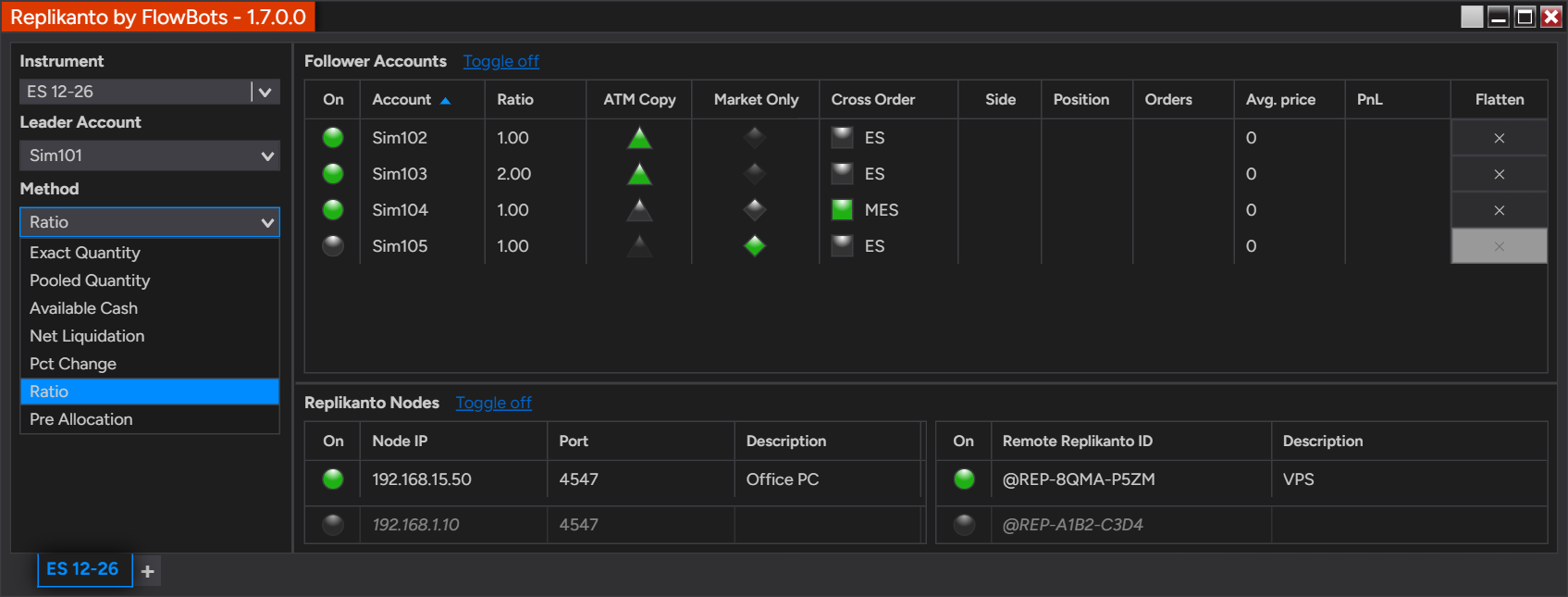
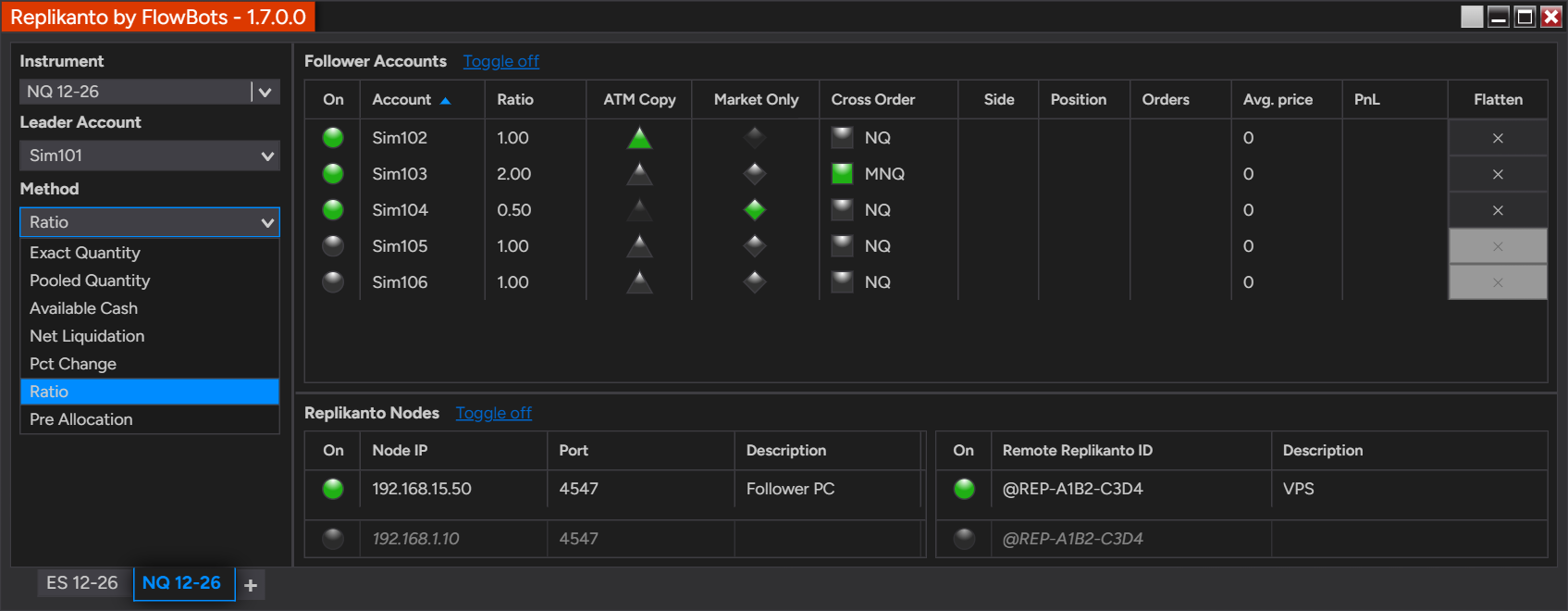
Choose the copy method for the tab in the Method list.
| Method | Designed for | Each follower receives |
|---|---|---|
| Exact Quantity | Futures and stocks | The leader’s quantity |
| Pooled Quantity | Futures and stocks | An equal share of the leader’s quantity |
| Ratio | Futures and stocks | The leader’s quantity times its own ratio |
| Pre Allocation | Futures and stocks | A fixed quantity you set for it |
| Net Liquidation | Stock accounts | A share based on its net liquidation value |
| Available Cash | Stock accounts | A share based on its available cash |
| Pct Change | Stock accounts | A percentage of its own existing position |
Follower quantities are rounded down to whole contracts or shares; with Market Only and with multi-target exits, leftover fractions carry over to later fills.
Exact Quantity
Every follower receives the leader’s quantity. Example: a 4-contract ES order becomes a 4-contract order on each follower, whether you have four followers or six.
Pooled Quantity (formerly Equal Quantity)
The leader’s quantity is split equally. Example: a 40-contract MES order gives 10 contracts to each of four followers, or 6 to each of six followers (6.67 rounded down).
Ratio
Each follower has its own ratio, from -100 to 100: with 2.0, a 2-contract leader order becomes 4 contracts; with 5.0, 1 contract becomes 5. Ratios can be smaller than 1, but a small leader order can then round down to zero and not be copied; check it with the Ratio calculator spreadsheet. A negative ratio copies the trade in the opposite direction: the leader’s limit orders become stop orders on the follower (Stop Market or Stop Limit, as you choose in Properties) and its stop orders become limit orders. Works best with ATM Copy. Learn more about copying to accounts of different sizes.
Pre Allocation
Each follower receives the quantity you pre-allocated to it for every leader order, whatever the leader’s size. Use it with ATM Copy. How Pre Allocation works.
Net Liquidation and Available Cash (formerly Available Money)
The leader’s quantity is split in proportion to each follower’s net liquidation value, or its available cash. Example: a 700-share XYZ order, with followers A, B and C at $25,000, $50,000 and $100,000 (1:2:4), gives 100 shares to A, 200 to B and 400 to C.
Pct Change (formerly Percentage Change)
Increases or decreases each follower’s existing position by its percentage; a follower with no position in the instrument receives nothing.
| BUY ORDER | Positive percent | Negative percent |
|---|---|---|
| Long position | Increases position | No effect |
| Short position | No effect | Decreases position |
| SELL ORDER | Positive percent | Negative percent |
| Long position | No effect | Decreases position |
| Short position | Increases position | No effect |
Example 1: followers A, B and C are long 100, 400 and 200 shares of XYZ. With 50 as the percentage, a leader buy order adds 50, 200 and 100 shares.
Example 2: with -100 as the percentage, a leader sell order closes each follower’s long position.
Closing the leader’s position does not close Pct Change followers’ positions.
Features
Per-follower controls
Every follower is a row in the follower grid with its own on/off switch, ratio, pre-allocated quantity or percentage, Cross Order target, ATM Copy, Market Only and Flatten button. Columns you can show or hide: Connection, Side, Position, Orders (E:2 TP:4 SL:4), Average Price, PnL, Cash value and Net Liquidation, plus Factor with Net Liquidation and Available Cash. Followers PnL total sums the unrealized PnL of the tab’s local followers that are not Off, without currency conversion, and Lock follower settings while in a trade keeps settings from changing mid-trade. Grid columns explained.
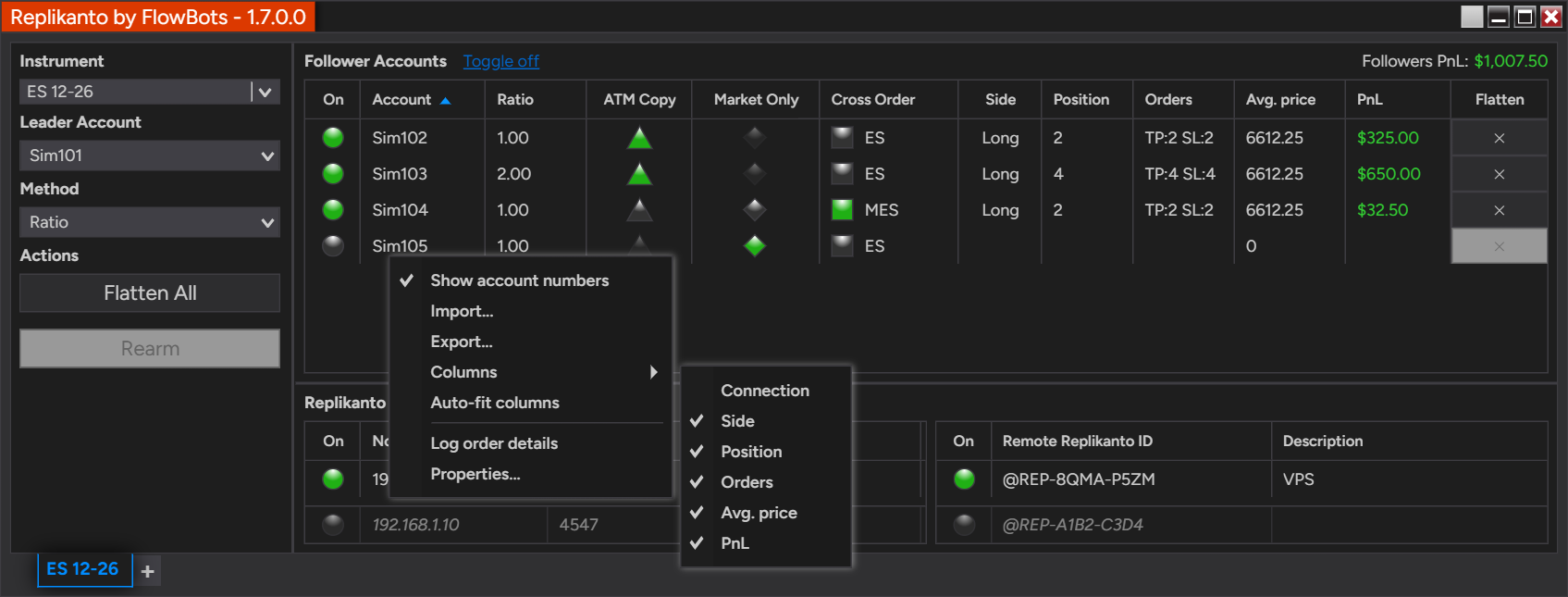
Right-click the follower grid to show or hide columns.
ATM Copy
An exclusive Replikanto feature: instead of copying the leader’s exit orders one by one, each follower runs the leader’s NinjaTrader ATM strategy on its own position, on local and remote followers. It makes Ratio and Pre Allocation especially flexible. Remote followers need an ATM strategy template with the same name on both computers; a custom, unsaved ATM strategy works for local followers only. Learn more · Step-by-step guide.
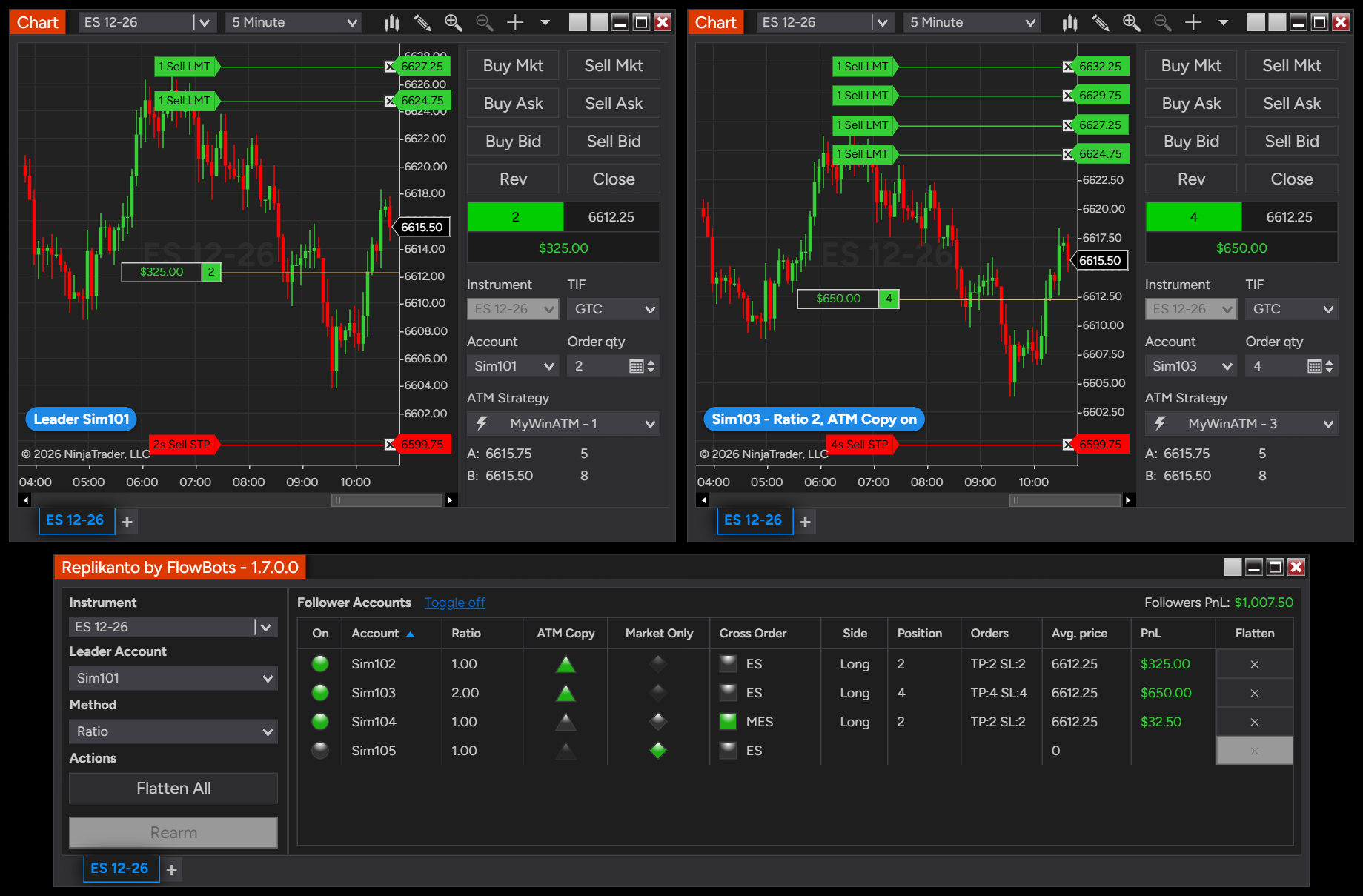
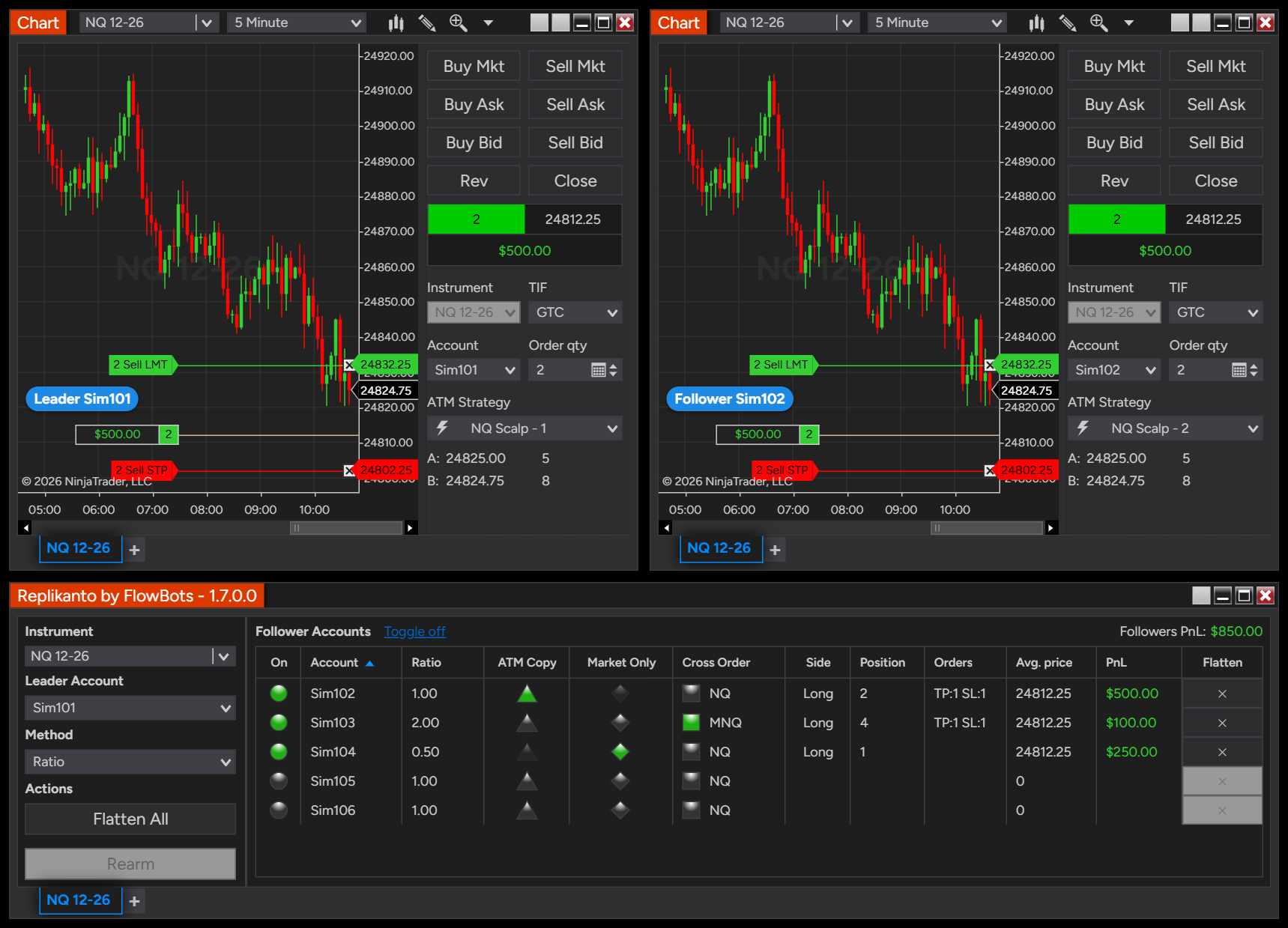
ATM Copy with Ratio 2: the leader Sim101 is long 2 contracts and its MyWinATM strategy places two targets. Sim103 is long 4 and runs its own MyWinATM strategy, with four targets and its stop.
Market Only
Copies only the leader’s executions, as market orders; limit and stop orders that have not filled on the leader are left out. For local and remote followers; it cannot be combined with ATM Copy on the same follower. Learn more.
Cross Order
Trade one contract size and copy another size of the same product: ES on the leader, MES on a follower, or the reverse. Up to three contract sizes per family, with each copied price rounded to the destination instrument’s tick. The default map covers 36 futures families:
- Equity indices: ES ↔ MES ↔ NES, NQ ↔ MNQ ↔ NNQ, YM ↔ MYM ↔ NDOW, RTY ↔ M2K ↔ N2K, FDAX ↔ FDXM ↔ FDXS, FESX ↔ FSXE, NF ↔ MNF
- Energy: CL ↔ MCL ↔ QM, NG ↔ MNG ↔ QG, RB ↔ QU, HO ↔ QH
- Metals: GC ↔ MGC ↔ 1OZ, SI ↔ SIL ↔ SIC, HG ↔ MHG, PL ↔ PLM, PA ↔ PAM
- Currencies: 6A ↔ M6A, 6B ↔ M6B, 6E ↔ M6E, 6J ↔ M6J, 6S ↔ M6S, ICD ↔ MICD, IJY ↔ MIJY, ISF ↔ MISF
- Grains and oilseeds: ZS ↔ XK ↔ MZS, ZC ↔ XC ↔ MZC, ZW ↔ XW ↔ MZW, ZM ↔ MZM, ZL ↔ MZL
- Crypto: BTC ↔ MBT, ETH ↔ MET, SOL ↔ MSL, XRP ↔ MXP
- Interest rates: TN ↔ MTN, UB ↔ MWN
- Volatility: VX ↔ VXM (needs a broker connection with access to Cboe Futures Exchange)
See the Cross Order Instrument Map, and customize your Cross Order instruments at any time, including adding a custom instrument pair.
Stealth Mode
Keeps Replikanto’s own identifiers out of the information recorded with your orders. An option for advanced users. Learn more.
More tools
- Flatten All closes the leader and its followers on the tab’s instrument in one click, including followers on other computers.
- Export/Import your list of followers, network nodes and Remote Replikanto IDs, each one independently.
- ScalperTicket integration: bid/ask trades are copied to local and remote followers, and Flatten All is available right in ScalperTicket.
- Remote Leader Filter lets a node tab accept trades only from the leader Replikanto ID and/or leader account name you enter.
- Update now: new versions for your license are downloaded, verified and installed in one click; restart NinjaTrader to finish.
- Prevent copying in an inactive workspace and Block copying of submitted trades for extra control.
- In English and Portuguese, following NinjaTrader’s language setting.
Safety
Follower Guard
Follower Guard watches every follower and steps in when one stops matching the leader. Each protection is optional, so you decide how strict it is:
- Disarm Followers: after any action below, the follower is disarmed and stops receiving copies until you rearm it.
- Cancel the follower entry order if it is not filled after the number of seconds you choose.
- Flatten the follower if it becomes out of sync with the leader for the number of seconds you choose.
- Flatten the follower if its position is in the opposite direction to the leader’s for the number of seconds you choose.
- Flatten the follower if an order is rejected by the broker, if an order could not be submitted, or if a change, a cancellation or any other request returns an error.
- E-mail alert to the address you choose whenever a follower is disarmed, through NinjaTrader’s e-mail share service.
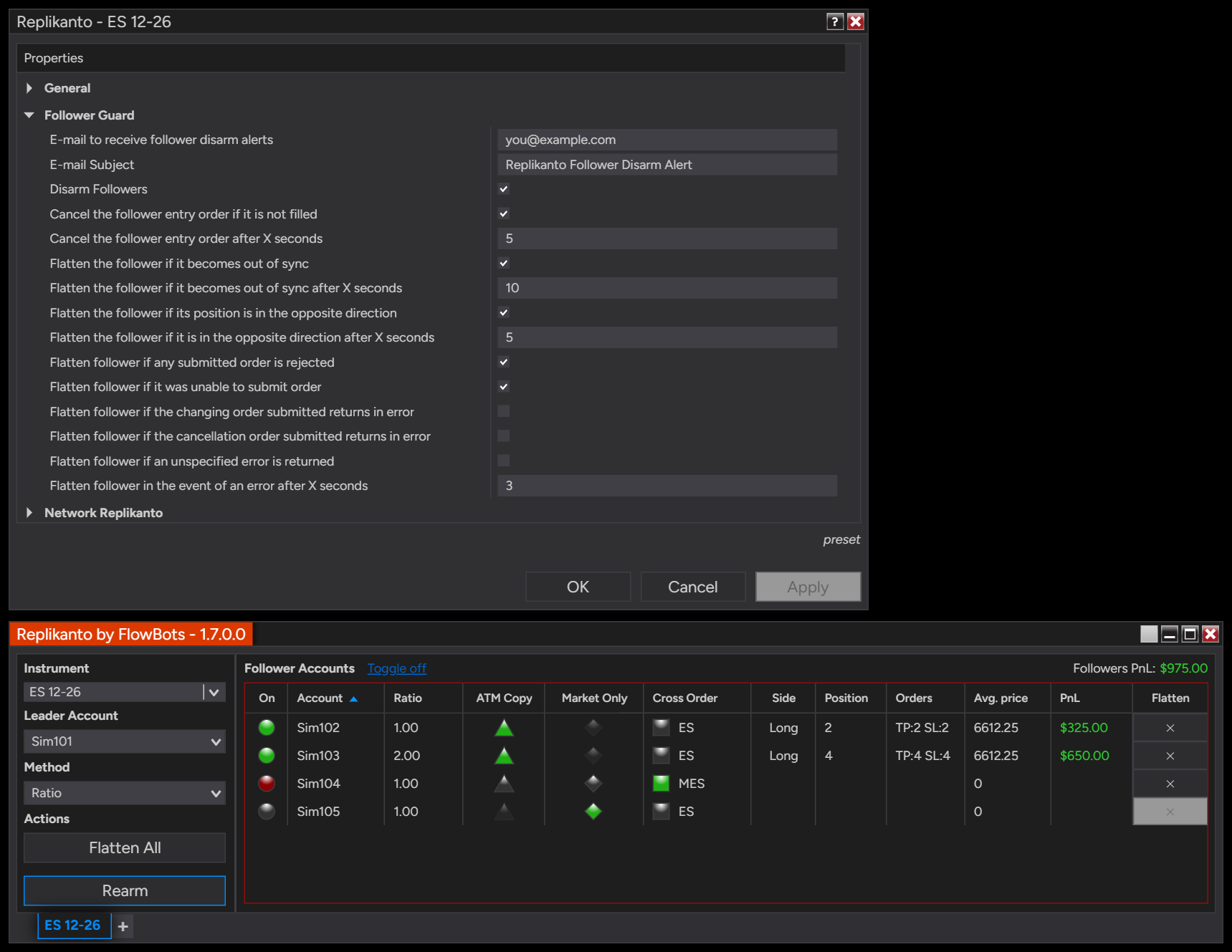
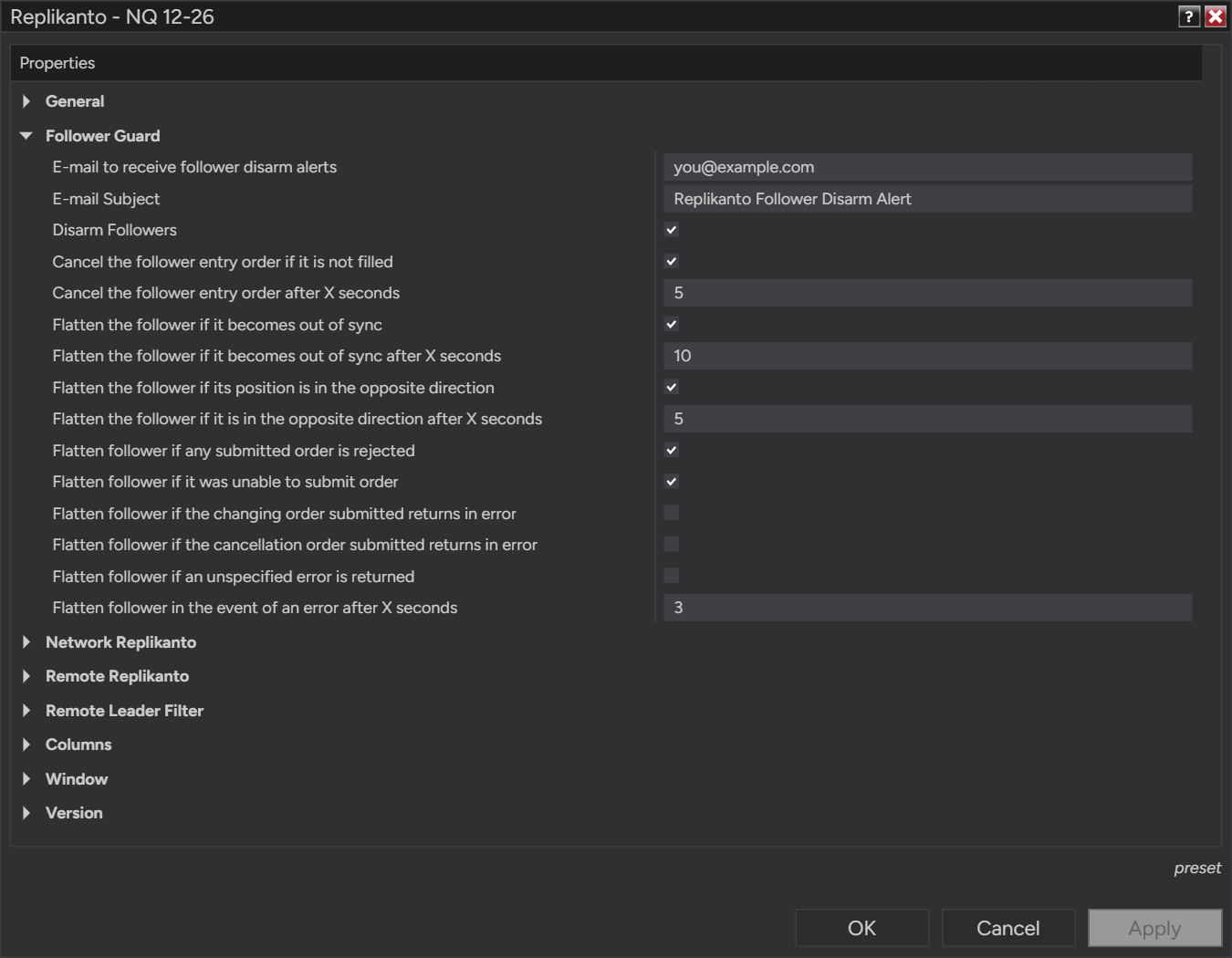
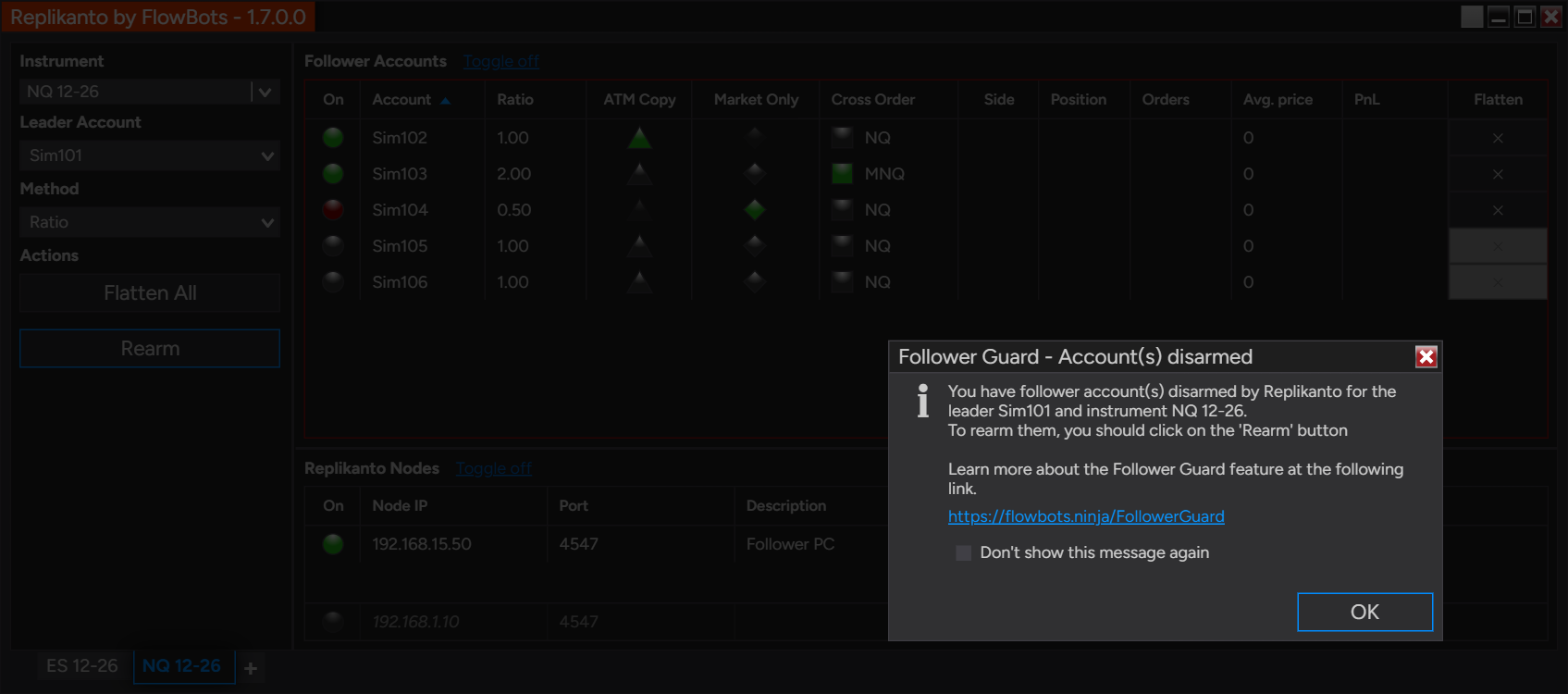
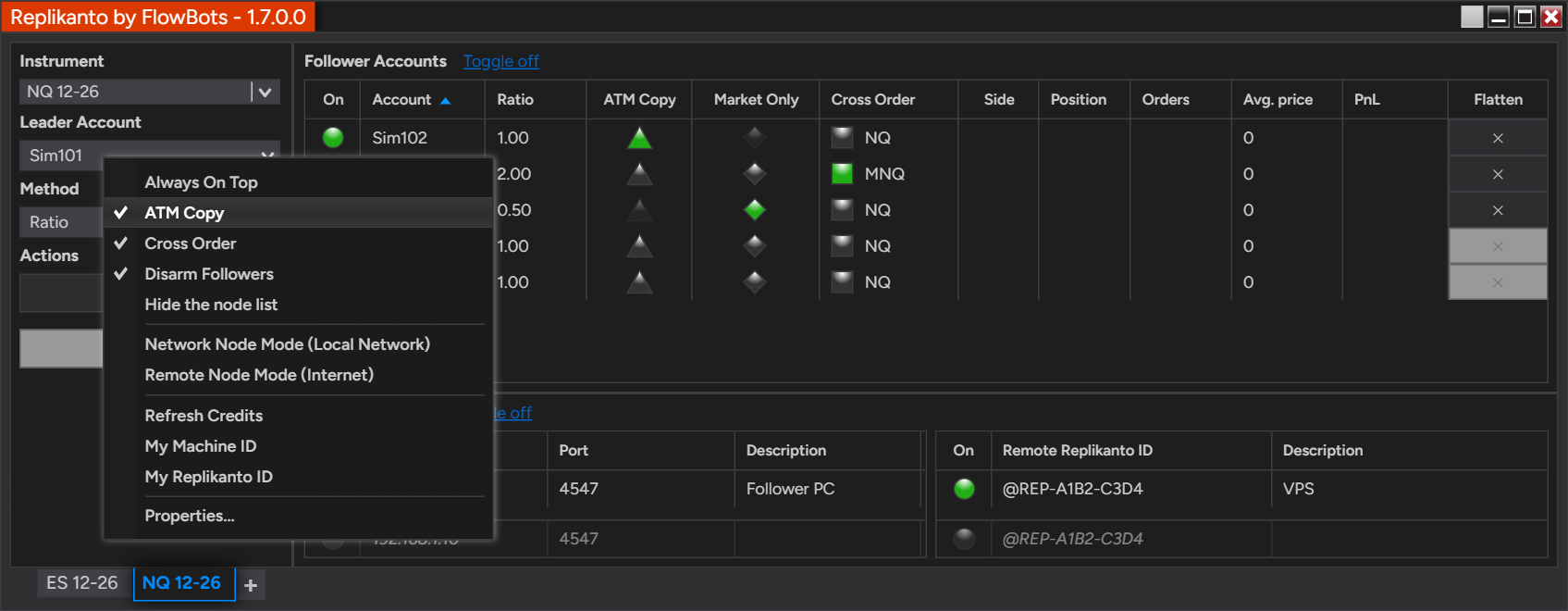
The Follower Guard options in Properties. Below, Sim104 was flattened and disarmed after its broker rejected an order, while the other followers keep copying; Rearm turns it back on when you are ready.
Learn more about Follower Guard · Follower Guard overview.
Built-in protections
- Rithmic position check. Before Replikanto flattens a follower or Follower Guard acts, it re-reads the real position from Rithmic, and it also checks on its own shortly after a fill without a position update, with no order sent. This matters because Rithmic does not always report position changes in step with fills, so NinjaTrader can show a position the broker has already closed, or miss a fill. On by default for every Rithmic account, leader or follower. Learn more.
- Exit-stop protection. When the leader moves an exit stop to a price the market has already passed, Replikanto waits for the leader’s result, then places the follower’s stop at a valid price and retries if the market keeps moving. This helps avoid broker rejections, stop desync and unwanted flattening; rare broker rejections are still possible.
- Lock follower settings while in a trade. A follower’s sizing and copy options, and the tab’s leader account, instrument and copy method, are locked while a trade is open. You can turn it off in Properties. Learn more.
- Separate OCO groups. With Stealth Mode or ATM Copy, each follower’s brackets use their own OCO group, so a fill on one account does not cancel another account’s orders on the same broker connection.
- Loop prevention. A trade is not copied back to the account it started on through other tabs.
Videos
Recorded with earlier versions of Replikanto, so some screens look different today; the workflow is the same.
ATM Copy
Copying trades from Tradovate
Exact Quantity method example
Local network copying example
Internet copying example
Internet copying with multiple instruments
What traders say
Our customer reviews are on Trustpilot. Read what traders say about FlowBots and Replikanto, in their own words.
Read our reviews on Trustpilot
Already a customer? You can leave your own review on the same page.
Licensing & FAQ
Requires NinjaTrader 8.1.6 or later. Copying between Playback accounts needs NinjaTrader 8.1.7 or later.
| License | Term | Includes |
|---|---|---|
| Trial | 7 calendar days, free | 20 Submit credits; Sim testing recommended |
| Single Machine | Lifetime or 1 year | 1 computer, 20 Submit credits |
| 2 Machines | Lifetime or 1 year | 2 computers, 20 Submit credits; best for local network and internet copying |
Support and updates are included for the first year and can be extended annually after that. A lifetime license keeps working after that year; a 1-year license stops working when it expires unless you renew it.
Which license do I need?
Leader and followers in one NinjaTrader 8, on one computer: Single Machine. Two computers, such as a home computer and a VPS, over your local network or the internet: 2 Machines. Every computer involved needs its own license. Not sure yet? Choose Trial above and test your setup on Sim accounts first.
Do I need a license for each account or each computer?
Not for each account: copying between accounts in the same NinjaTrader 8 needs one license. To copy to other computers, every computer involved, leader and followers, runs NinjaTrader 8 with Replikanto and needs its own license; a 2 Machines license covers two.
What are Submit credits?
Credits are used only for internet copying (Remote Node Mode): copying on the same computer or over your local network does not use them, and changes and cancellations are free. The sending computer uses one credit per order for each remote computer it sends to. Every license includes 20, and when credits run out, trades are not sent over the internet; more credits are available at any time. How internet copying works. Internet copying also needs a signed NinjaTrader Machine ID on each computer (how to generate it).
Which brokers and prop firms does it work with?
Replikanto copies between accounts connected to NinjaTrader 8, such as Rithmic, Tradovate, Interactive Brokers and Sim accounts. Some prop firms do not allow trade copiers, so check your firm’s rules before you use Replikanto on its accounts.
What happens if a follower’s broker rejects an order, or the follower falls out of sync?
Depending on the Follower Guard protections you enable, Replikanto cancels an unfilled entry, flattens the follower, disarms it and sends you an e-mail, so you can check the account and rearm it.
Do I need a different build when NinjaTrader updates?
No. One Replikanto build works on every NinjaTrader 8.1.6 or later, and Update now installs new Replikanto versions in one click.
Does it work on a Mac?
NinjaTrader 8 and Replikanto run on Windows. On a Mac, you can run them in a Windows virtual machine; FlowBots does not provide support for setting up virtual machines. Learn more.
Can I try it first?
Yes. Choose Trial above: 7 calendar days, free, with 20 Submit credits. Test your setup on Sim accounts before copying to live accounts, and test internet copying right away: add @REP-TEST-ECHO as a Remote Replikanto ID and watch your orders arrive on replikanto.com. Trading futures and stocks involves risk.
More answers in the Knowledge Center. Read the Terms of use and the release notes.